Deploy code to the primary server and test it
After making changes to the code on your feature branch, use Code Manager to push those changes to the primary server.
- To deploy the code from the feature branch to the primary server, run this Code Manager command:
puppet code deploy --wait <FEATURE_BRANCH>
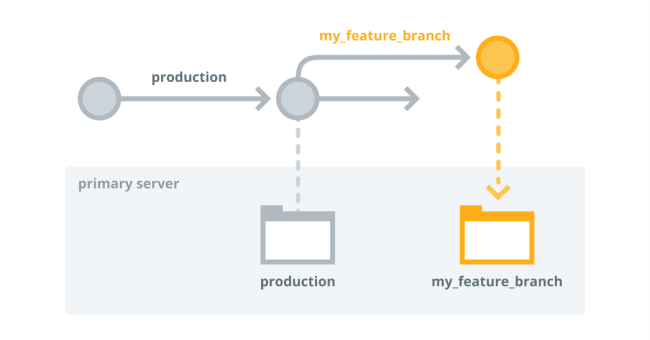
After this code deployment, wait while Puppet Server loads the new code. The primary server now has code from the main/production branch and the feature branch.
- To test your changes, use this orchestrator command to run Puppet on a few agent-specified development nodes in
the feature branch environment:
puppet job run --nodes <DEV-NODE1>,<DEV_NODE2> --environment <FEATURE_BRANCH>
You can also use the console to create a job targeting a list of nodes in the feature branch environment.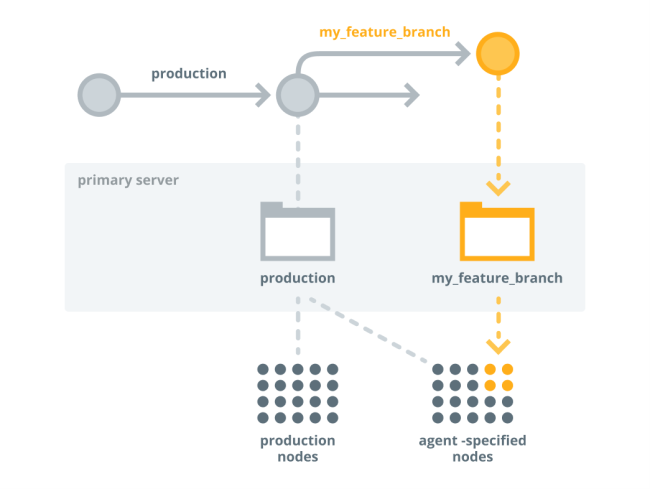
At this point, the production environment maintains the original code deployed to all production nodes, and the feature branch environment has deployed your new code from the feature branch to the nodes you specified.
- Review the node run reports in the console by opening the links in the orchestrator command output or using the Job ID linked on the Job list page. Verify the code changes had the intended effect.


