Additional command line tools
Once you understand how to write manifests, validate them,
and use puppet apply to enforce your
changes, you're ready to use commands such as puppet
agent, puppet resource, and
puppet module
install.
puppet
            agent
Like puppet apply, the puppet agent command line
tool applies configuration changes to a system. However, puppet
agent retrieves compiled catalogs from a Puppet Server, and applies them to the local system. Puppet is installed as a Windows service, and by default tries to contact the
primary server every 30 minutes by running puppet agent to retrieve
new catalogs and apply them locally.
puppet resource
You can run puppet resource to query the state of a particular type
of resource on the system. For example, to list all of the users on a system, run
the command puppet resource user.
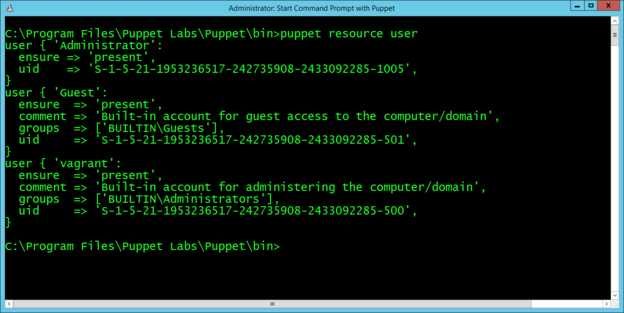
The computer used for this example has three local user accounts: Administrator, Guest, and vagrant. Note that the output is the same format as a manifest, and you can copy and paste it directly into a manifest.
puppet module
        install
Puppet includes many core resource types, plus you can extend Puppet by installing modules. Modules contain additional resource definitions and the code necessary to modify a system to create, read, modify, or delete those resources. The PuppetForge contains modules developed by Puppet and community members available for anyone to use.
Puppet synchronizes modules from a primary server to
agent nodes during puppet agent runs. Alternatively, you can use
the standalone Puppet module tool, included when you
install Puppet, to manage, view, and test
modules.
Run puppet module list to show the list of modules installed on the
system.
To install modules, the Puppet module tool uses the
syntax puppet module install NAMESPACE/MODULENAME. The
NAMESPACE is registered to a module, and
MODULE refers to the specific module name. A very common module
to install on Windows is registry,
under the puppetlabs namespace. So, to install the
registry module, run puppet module install
puppetlabs/registry.


